The Bigger Screen Myth: Why Phone Size Is Not the Whole Experience
Phone size is not the whole experience: compare grip, thumb reach and interface layout to choose a display that feels easier in everyday use.
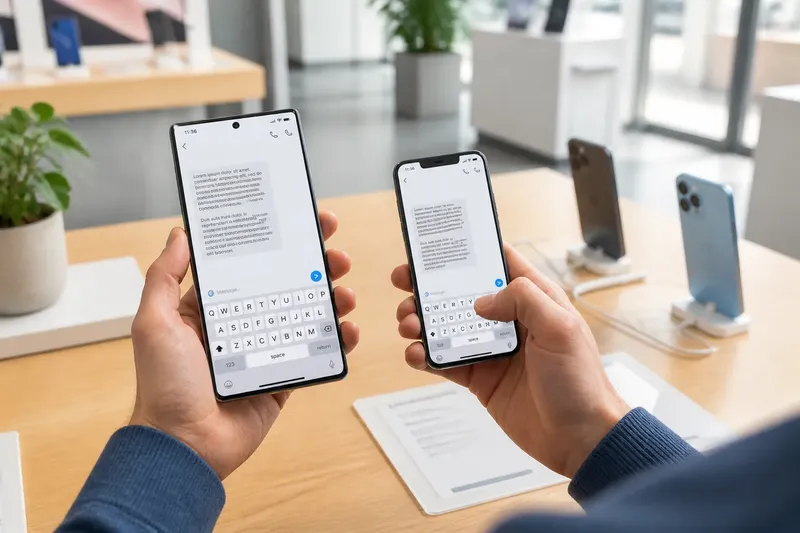
You pick up a phone in a shop to read a message, then try to tap the reply button without shifting your hand. The larger display gives the text room, but the button sits just beyond your thumb. Phone size is not the whole experience: comfort depends on how the screen, frame and interface work together.
To judge a phone for everyday use, start with what you need to see, then consider how you hold it, where your thumb can reach and how the interface places its controls. This separates a genuinely useful display from one that merely looks spacious on a shelf.
What do you need the screen to show?
Begin with the tasks that make you wish for more screen space. Reading long messages, viewing a map, checking a document or following a recipe can all benefit from a larger display, but they make different demands. A map needs legible labels and visible surroundings; a message may need comfortable text and room for the keyboard.
Notice what currently forces you to pinch, zoom, scroll sideways or open another app. If small text is the problem, display settings may help without changing phones: try a larger font, bold text or a different screen zoom option. If a map hides too much of its route, extra display area may be more relevant.
Consider whether you usually view content in portrait or landscape. A wider display can make videos and some documents more comfortable, while a tall, narrow phone may suit scrolling and one-handed carrying. Check the actual content and controls you use rather than relying on a general rule.
How should you compare the size of a phone?
Screen size is only one part of the object in your hand. The visible display sits inside a body with its own width, thickness, edges and weight. Two phones with similar displays can feel quite different if one has a broad frame or slippery, rounded sides.
Where possible, hold the actual phone rather than judging it from a specification or picture. Keep your usual case in mind: it can add bulk, change the feel of the edges and make a narrow grip harder to maintain.
Try the same actions on each model: hold it in your usual hand, unlock it, read a short message and reach for a control near the far side. Notice whether your fingers settle naturally, the phone presses into your palm or you instinctively adjust your grip. Include the tasks that matter to you, since a brief shop visit may not reveal how it feels during a longer reading session.
Weight matters alongside width. A larger phone may be comfortable when supported by both hands but tiring to hold one-handed for a long time. Compare the feeling in your own hand rather than treating a larger screen as a substitute for an easy grip.
Can your thumb reach the controls you use?
Reach is not the same as display area. A thumb moves easily across some parts of the screen and has to stretch or shift the hand for others. The comfortable zone varies with hand size, grip and task, so try your own movements rather than relying on a diagram.
Open an app you use often and try its main actions without changing hands. Can you return, open search, select a message or reach the relevant button while keeping the phone secure? Notice whether your palm has to slide, your fingers loosen around the frame or you begin using your other hand.
Imagine you are comparing two phones in a shop. Your starting point is the same messaging app, the same long message and the same usual grip. On the wider model, you can read the message without zooming, but the send control sits outside your relaxed thumb reach; on the narrower model, the text needs more scrolling, yet the main controls feel accessible. The result is a clear trade-off: choose the wider display if easier reading matters more, or the narrower body if avoiding grip shifts matters more in your routine.
A larger phone can still work well one-handed if its important controls sit within reach. A compact phone can feel awkward if its case is slippery or a frequently used button sits high on the display. Judge the whole interaction rather than the distance your thumb can cover in isolation.
How does interface layout change the experience?
Apps decide where their navigation, buttons and content appear. Controls may sit near the bottom, in a top corner or inside a side panel. System settings can also change text size, display zoom and one-handed access features, though options vary by model and software.
Check the apps you rely on, not only the home screen. A large display may show more of a document but place a toolbar farther from your hand. Another app may use the extra room for larger controls or a clearer two-column layout. The benefit depends on how the app adapts, not just on how much glass is present.
Try one-handed mode if your phone offers it. It may bring parts of the interface closer, but can also reduce the visible area or require an extra gesture. Treat it as an option to assess, not a fix that makes every large phone comfortable.
Like a kitchen drawer, a screen can hold more without making the things you reach for easier to find. The layout determines whether useful controls are close at hand or at the far end. If an app offers adjustable toolbars, text size or layout, try those settings before deciding that the phone itself is the problem.
Which questions help you choose a phone size?
Does a larger screen make text easier to read?
It can show more text at once, but the default text may still be too small for you. Compare the same page with your preferred font and display settings, and notice whether you can read comfortably without constant zooming.
Is a narrower phone always easier to use one-handed?
Not necessarily: edge shape, case material, weight and control placement also affect grip and reach. Hold the phone as you normally would and try the actions you perform most often.
Can settings make a large phone easier to manage?
Font size, display zoom and one-handed modes may improve particular tasks. They do not change the phone’s physical width or weight, so assess both the adjusted interface and the unaltered grip.
Should I compare screen measurements or the full phone body?
Compare both, then handle the phone if you can. Display dimensions describe the viewing area; the body’s width, edges and weight shape how securely and comfortably it sits in your hand.
How can you make a fair comparison?
Use the same content and actions on each phone so your impression does not depend on one model showing a larger font or a different app layout. For each check, note the observation and let it guide the next decision:
- Check whether a message is legible at your usual text size; if you need to zoom repeatedly, then try a larger font or favour a display that lets you read comfortably.
- Check whether the same map route and its labels remain visible; if the route feels cramped, then favour more display area or adjust the map view.
- Check whether you can reach your regular controls without shifting your grip; if you cannot, then try one-handed mode or favour a narrower body.
- Check whether your fingers hold the phone securely with your usual case; if the case feels bulky or slippery, then try a different case or compare the phone without it.
- Check whether one-handed use makes your hand tense; if it does, then use two hands for those tasks or favour a phone that feels more manageable in one hand.
- Check whether a toolbar or navigation control sits awkwardly far away; if it does, then try the app’s layout settings or choose a phone and interface combination with more accessible controls.
Record what each phone makes easier and what it makes more awkward. Do not turn the comparison into a test of how far you can stretch your thumb: ordinary actions should not require keeping your grip at its limit.
What should decide between two phone sizes?
Give priority to the tasks that matter most in your day. If reading and viewing maps are frequent frustrations, a larger display may be worth a little more reach or using both hands. If you often reply while carrying a bag or standing on a bus, a comfortable hold and reachable controls may matter more than seeing extra lines at once.
Consider where you use the phone, too. At a desk or on a stand, weight and one-handed reach may matter less. On the move, the same device may be handled in short bursts with one hand, making its width, case and button placement more noticeable.
Phone size is not the whole experience; the better choice suits both what you need to see and how you need to hold it. To choose a phone size with confidence, repeat your comparison using your usual apps and preferred settings, then decide which trade-off you are genuinely happy to live with.