Before the App Store: How Early Phones Handled Extra Functions
Before the App Store, phone makers used built-in tools, downloadable programs and network services to extend a handset’s usefulness in distinct ways.
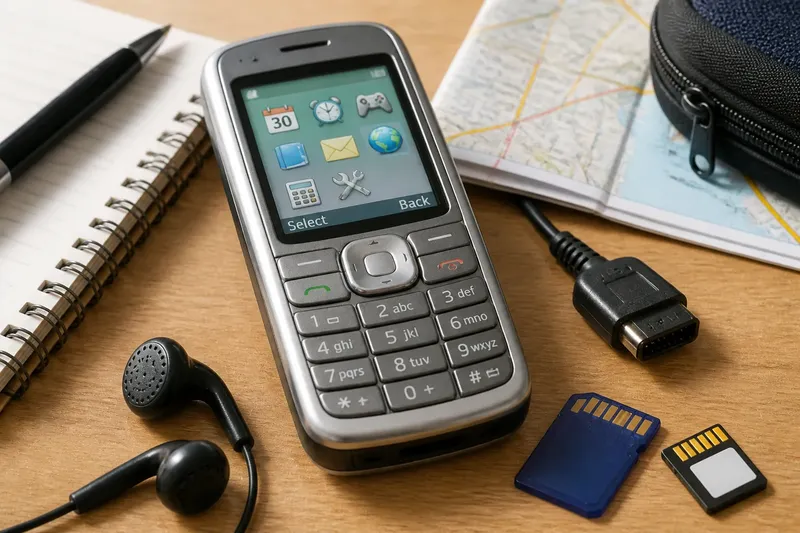
A person waiting for a bus could check a calendar, play a simple game or compose a message on a phone with no app shop. Before the App Store, phone makers already faced a practical choice: should extra functions come with the handset, be downloaded later or be delivered by a network service?
Those approaches reflected different ideas about what a phone was for, how much choice its owner should have and who would maintain its software. Their history is less a straight march towards apps than a record of competing trade-offs.
What did built-in phone tools offer?
Early handsets commonly included an address book, calendar, alarm, calculator and text messaging. These were ready to use from the start, often arranged in plain menus designed for a small screen and a numeric keypad. A game or ringtone tool might sit beside them, chosen by the phone maker or mobile operator.
The strength of built-in functions was their directness. A calendar needed no separate download, account or search; it was simply part of the phone’s menu. The limitation was just as clear: owners generally got what the maker had chosen, and adding a missing tool could be difficult or impossible.
This approach suited someone who wanted familiar basics without managing extra software. It also suited phones designed around a narrow set of everyday tasks. Think of a pocket notebook supplied with a pen: useful immediately, but its contents and format are set by whoever made it.
How did downloadable software change the deal?
Some phones could accept additional programs, games or themes. Depending on the handset and its software platform, people might obtain them from an operator portal, a manufacturer’s service, a computer connection or another distribution route. Compatibility mattered: a program intended for one operating system or model might not work on another.
Downloads shifted some control towards the owner. Instead of accepting only pre-installed tools, a person could choose a particular game, organiser or utility and add it when needed. That choice brought extra work: finding a compatible program, installing it and dealing with possible storage limits, connection costs or awkward menus.
Say you have an early handset with a basic calendar and want a specialised schedule tool. You find a compatible downloadable program through the phone’s available service, install it and expect a new option to appear in the menu. If the handset does not support the program, the download will not solve the problem; compatibility sets the boundary.
Downloadable software suited curious owners who were comfortable exploring menus and accepting some setup. It was less appealing to someone who wanted every feature to behave as a fixed part of the phone. A download was like adding a drawer to a desk: it could make the desk more useful, but only if it fitted.
What could network services add?
A third approach put functions on the mobile network rather than installing them as ordinary phone programs. Operator portals and messaging services could provide information, entertainment or account tools through a handset’s browser or messaging interface. The phone acted as a doorway; the service itself lived elsewhere.
This could make a service available without asking the owner to manage a separate application. It also tied the experience to network coverage, the operator’s menu and the service’s continued availability. A slow or confusing route through several screens could make a useful idea feel remote, especially on a small display.
Network services suited people who wanted occasional access to information or entertainment without keeping another program on the handset. They could also serve functions that relied on fresh information from a provider. Their weakness was dependence: if the service changed, disappeared or became hard to reach, the phone’s built-in tools remained, but the extra function might not.
Which approach suited which kind of use?
Each approach answered a different need. Built-in tools favoured immediate access; downloads offered personal selection; network services connected the handset to functions maintained elsewhere.
- Check for a built-in tool: if the task is basic and should work straight from the menu, use the ready-made function; if it is missing, consider a compatible download or service.
- Check the software platform: if it supports the program you want, look for a compatible download; if it does not, choose a different tool or use an available network service.
- Check how current the information must be: if it changes often, use a network service when available; if it is mostly stored or personal, a built-in tool or download may suit better.
- Check the route to the function: if it takes too many menu moves or requires a computer, choose a simpler built-in option when one exists; otherwise decide whether the setup is worthwhile.
- Check network dependence: if the function must be available without coverage, favour an on-device tool; if occasional access is enough, a network service may be suitable.
- Check storage and connection requirements: if a download fits the handset and can be obtained conveniently, install it; if not, keep to built-in tools or look for a service that needs no separate program.
Imagine a traveller with an older handset who wants an alarm, a route update and a favourite puzzle game. The alarm is already in the menu, so no extra software is needed for waking up. The route update depends on current information, so the traveller uses the operator’s portal when the network is available; the puzzle is offered as a compatible download, so installing it adds a game to the menu. If that download is incompatible, the traveller keeps the built-in games instead. The result is a mix of approaches, each chosen for the task rather than for a single idea of what a phone should be.
What do readers often ask about early phone software?
Did early phones have apps?
Some did, though the term and distribution model were not always the same as those of today’s app stores. One phone might support downloadable programs, while another offered only built-in functions and operator services.
How were programs installed on older phones?
Methods varied by handset and platform. Programs could arrive through an operator or manufacturer service, a mobile browser or a computer connection, with compatibility shaping what could be installed.
Why were built-in tools so common?
They gave makers a way to provide useful functions without asking owners to find and install separate software. On phones with limited interfaces, a small set of ready-made tools could also be easier to reach and understand.
Did downloadable programs work on every phone?
No. Programs depended on compatible software platforms and handset capabilities, so a download for one phone might not run on another. The device’s instructions and the program’s compatibility information are sensible places to check.
How should you read this history?
The path to modern app stores was not a simple replacement of old phones by new ones. Built-in tools, downloadable programs and network services each addressed a different need: immediate access, owner choice or connection to an outside provider. Their strengths also exposed lasting tensions between simplicity, flexibility and dependence on services.
Before the App Store, extra phone functions were already a question of design and ownership. The next time an older handset turns up in a drawer, its menus can tell you more than which tools it had: they show whether its maker expected you to accept, add or access each capability.